Managing money is… tricky, right? Bills, groceries, gas, nights out… it all adds up faster than you think. And then there’s the pile of receipts. You know the ones—faded, crumpled, or gone before you even noticed. That’s where a receipt scanner app comes in handy.
We’ll look at why Americans are turning to them, how they actually work, and why they can make a huge difference in managing your spending.
So, What Exactly Is a Receipt Scanner App?
Basically, it’s an app that lets you snap a photo of your receipt and then handles all the boring stuff for you. It pulls out the date, the store, how much you spent—even taxes in some cases. Everything is stored neatly in one place.
In the US, with sales tax varying by state and deductions for business or work expenses, it’s really helpful for keeping things organised—whether it’s personal finances, freelance work, or running a small business.
Why Americans Are Loving Receipt Scanner Apps
Let’s be honest—money can slip away fast. The average US household spends roughly $1,800 a week on groceries, bills, rent, and occasional splurges. Without a system, receipts disappear, and those small costs? They quietly add up.
Here’s why people are turning to a receipt scanner app:
- No more shoeboxes stuffed with crumpled paper
- Snap a receipt in seconds and it’s safely store
- Spot patterns in your spending and stop leaks
- Easier tax season or claiming business expenses
- Check your spending anywhere, anytime
How It Works
Most apps are super simple. Snap, done. Here’s the breakdown:
- Take a photo – Make it clear so the app can read it.
- Automatic reading – It extracts the key info: date, store, amount. Some even sort by category.
- Organize – Everything goes into neat folders or categories. Add notes if you want.
- Backup – Most apps store receipts in the cloud, so they’re safe.
- Some apps even connect with accounting or budgeting software—super handy for small business owners and freelancers.
Picking the Right App in the US
There are tons of receipt apps out there, but honestly… many just don’t cut it.
What to look for:
- Can it read receipts accurately? Some apps miss details.
- Easy to use—no one wants to spend hours figuring it out.
- Cloud storage for safety.
- Strong security—financial info is sensitive.
- US-specific support—sales tax, currency, business rules.
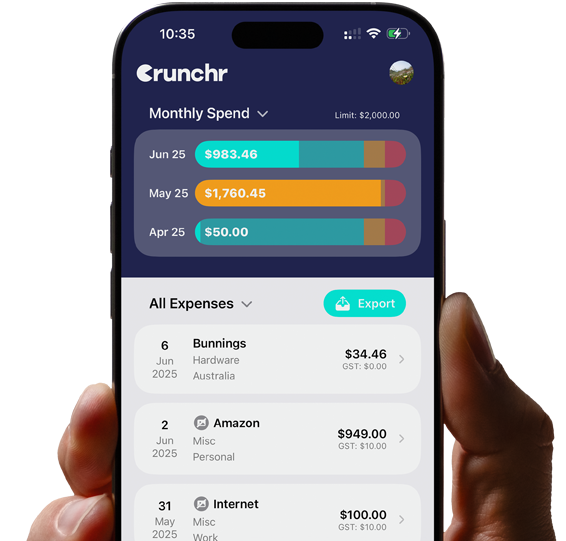
Apps like Crunchr are designed for US users, with live budget tracking and tax-ready features built in.
Why You’ll Love It
- Saves time – Snap a receipt instead of typing it all into a spreadsheet.
- Better budget control – See where your money is going and adjust.
- Taxes sorted – Keep receipts for deductions or business claims.
- No more paper clutter – All receipts in one place, safe from fading or disappearing.
- Track your habits – Notice spending patterns before they get out of hand.
Handy Tips to Make It Work
- Snap receipts immediately
- Check categories for accuracy
- Add tags or notes like “work lunch” or “office supplies”
- Sync with your bank or accounting apps
- Review spending weekly to spot trends
A Real-Life Example
Imagine a week goes by—coffee here, groceries there, maybe a night out. What happens to the receipts? Most of them just vanish or get stuffed somewhere and forgotten.
With Crunchr, snap each receipt as you get it. By week’s end, you’ll see where your money went, spot leaks, and know exactly what to tweak next week. It’s not just numbers—it’s feeling in control.
Common Mistakes Without an App
- Ignoring receipts
- Writing expenses manually
- Missing small costs that add up
- Struggling during tax season
- Not noticing spending patterns
- A receipt scanner app fixes all that.
- Features Americans Should Look For
- Automatic sales tax tracking
- Multi-currency support for online shopping
- Bank integration
- Analytics dashboards
- Offline mode
Why Paper Receipts Are Fading
Most of us carry smartphones everywhere. Paper receipts fade and get messy. Digitizing them keeps everything searchable. Type a few words and bam—there’s your receipt. So much easier.
For Small Business Owners or Freelancers
If you run your own business or freelance:
- Track client expenses separately
- Send receipts to your accountant easily
- Claim tax deductions without stress
- Keep tabs on cash flow
The Future
AI and smart tech are making receipt apps even smarter:
- Automatic categories
- Suggestions for saving money
- Smart reminders to snap receipts
- Managing money is becoming easier, not harder.
Crunchr: US Favourite
Crunchr isn’t just a scanner—it’s a full budget companion:
- Snap receipts in seconds
- Live view of spending
- Automatic tax calculations
- Easy export for taxes
- Cloud backup
No more lost receipts. No guesswork. Real control over your money.
Getting Started
- Download Crunchr from the App Store or Google Play
- Create an account
- Snap your first receipt
- Watch your spending appear in real-time
- Review weekly and adjust
Tracking your money? It doesn’t have to be stressful. A receipt scanner app—it’s not just about keeping receipts neat. Ever wish you could actually see where your money disappears each month? That’s exactly what digital receipts help with—they make tracking your spending way less stressful.
Doesn’t matter if it’s for your personal budget, a side hustle, or a small business—these things can seriously change the way you manage money.
With Crunchr, it’s more than just snapping receipts. You get a clear picture of your spending, can spot leaks before they become a problem, and actually feel on top of your money.