Receipt management ought to be straightforward.
Snap a photo. Upload it. Done.
But for many sole proprietors, independent contractors, small business owners, and everyday people, it rarely feels that simple.
Tools like Expensify are well-established in the receipt management space. They’re familiar, widely used, and commonly recommended — especially in corporate or accounting contexts.
Yet newer platforms like Crunchr are redefining what receipt management should actually feel like.
Not by piling on features.
By rethinking the whole experience.
Below, we dive into why Crunchr is a superior alternative to Expensify, specifically for receipt management, ease of use, accessibility, and real-world financial confidence — not just for accountants, but for actual people.
How Receipt Management Has Evolved
Modern receipt management isn’t just about storing files anymore.
It’s about:
- Understanding where your money goes
- Gaining clarity on spending habits
- Making real decisions without stress
- Feeling financially grounded instead of overwhelmed
That’s the shift reception tools need to make.
Many traditional products still prioritize data capture over user clarity — and Expensify is a perfect example.
What Expensify Does Well — And Where It Falls Short
To give credit where it’s due, Expensify does offer:
- Receipt scanning
- OCR data extraction
- Expense reporting
- Integration with accounting systems
- Card and bank import options
For mid-size companies or corporate teams with standardized workflows, those tools can be helpful.
But for most everyday users — especially those without finance teams or accounting backgrounds — Expensify can feel overwhelming.
Expensify Is Designed Around Corporate Workflows
Here’s the key difference:
Expensify was built with a heavy focus on:
- Enterprise users
- Professional expense reporting
- Reimbursement workflows
- Controller and CFO perspectives
Not everyday people.
That emphasis shows up in:
- Complex interfaces
- Finance-heavy terminology
- Feature prioritization aimed at corporate clients
- Pricing tied to enterprise needs
If you’re just trying to understand your own spending and manage receipts easily, Expensify often feels like drinking from a firehose.
Crunchr Comes at It From a Different Angle
Crunchr begins with a very different question:
Instead of asking:
“How do finance teams want receipts handled?”
Crunchr asks:
“How do real people spend money in their daily lives?”
That difference — subtle as it sounds — changes everything.
Crunchr vs Expensify: Two Philosophies of Receipt Management
Expensify: Capture First, Understand Later
With Expensify, the workflow tends to be:
- Snap a receipt
- Extract the data
- Export or sync into a system
Understanding comes after processing — often in another platform, or in a report someone else analyzes.
Crunchr: Insight As You Go
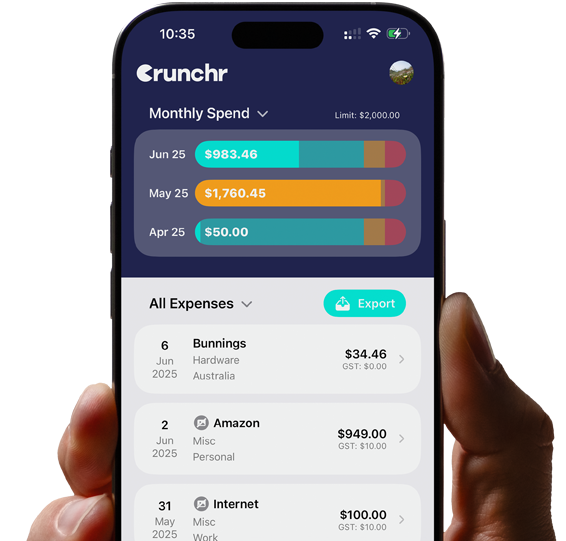
Crunchr is built around active expense logging and instant visibility.
Not delayed reporting.
Not back-office review.
When you log an expense in Crunchr, you instantly see:
- How it affects your spending
- How it fits into your budget
- Patterns emerging over time
This real-time clarity is a game-changer.
Why Crunchr Works Better for Everyday Receipt Management
- Designed for People, Not Accountants
Crunchr doesn’t assume:
- Financial expertise
- Accounting knowledge
- Perfect bookkeeping habits
It assumes real life — messy receipts, varied spending patterns, and imperfect data.
Expensify assumes structured processes first.
Crunchr supports clarity over time.
- Receipt Management Without Stress
Traditional receipt software often feels intimidating.
Why?
Because:
- Mistakes feel costly
- Interfaces feel technical
- Numbers feel absolute
Crunchr softens that experience.
It’s designed to build confidence, not demand compliance.
That emotional layer matters.
- Behavior Change — Not Just Capture
Expensify is mainly passive:
You take a photo. It gets processed. Maybe someone reviews it.
Crunchr is active:
You log your expenses and instantly see:
- Spending trends
- Categorized totals
- Budget impacts
This feedback loop encourages smarter habits.
Expensify organizes receipts.
Crunchr reshapes how you handle money.
Usability: Crunchr vs Expensify
Where Expensify Can Struggle
Common feedback includes:
- Too many menus and options
- Finance-first language
- Onboarding that feels technical
- Best results with guided setup
For individuals or small teams, that can be a barrier.
Crunchr Feels Immediate
Crunchr doesn’t require:
- Long tutorials
- Accountant setup
- Complex configuration
Open it. Use it. Get insight.
Manage receipts in a way that feels intuitive.
That ease makes a real difference in adoption and long-term use.
Pricing: Clear vs Complicated
Expensify Pricing Can Feel Enterprise-Focused
Expensify pricing often scales with:
- Number of users
- Corporate features
- Add-ons intended for large organizations
For freelancers or small businesses, that can feel like paying for things you don’t need.
Crunchr Pricing Matches Real Usage
Crunchr’s pricing reflects:
- Individual use
- Actual needs
- Everyday patterns
It’s built to support your life or business — not a large finance team.
That alignment matters.
Receipt Management for Non-Accountants
This is where Crunchr truly stands out.
Most people:
- Aren’t accountants
- Don’t want to be
- Don’t think in spreadsheets
Expensify often assumes otherwise.
Crunchr doesn’t.
Crunchr vs Expensify for Freelancers
Freelancers need:
- Quick receipt capture
- Tax visibility
- Low cognitive load
Expensify can feel like overkill.
Crunchr feels just right.
You:
- Log expenses
- See totals
- Stay organized
Without being buried in accounting structures.
Crunchr vs Expensify for Small Businesses
Small business owners juggle dozens of tasks.
Finance shouldn’t add to the overload.
Crunchr supports:
- Easy expense entry
- Category clarity
- Budget awareness
Without pulling you into complex accounting software.
Expensify often pushes users deeper into technical workflows.
What’s Wrong With “Integration-First” Receipt Tools?
Expensify emphasizes integrations with other systems.
And integrations do matter.
But leading with them creates problems:
- Users become dependent on multiple tools
- Insight happens later, not now
- Mistakes propagate through systems
Crunchr prioritizes standalone comprehension first.
Integration comes second.
That’s the right order for most people.
Why Crunchr’s Real-Time Model Matters
Crunchr emphasizes visibility as you work — not bank feed imports.
That’s intentional.
Bank feeds tell you what already happened.
Logging expenses shows you what you’re doing right now.
That’s the awareness gap Expensify often misses.
Receipt Management Is Emotional, Not Just Administrative
This is something Expensify doesn’t address.
Receipt management is tied to:
- Control
- Anxiety
- Confidence
Crunchr acknowledges the psychological side, not just the technical one.
Reporting: Crunchr vs Expensify
Expensify Reporting
Expensify’s reports are:
- Detailed
- Corporate-oriented
- Best for audits
Great for organizations. Less helpful for everyday decisions.
Crunchr Reporting
Crunchr reports are:
- Simple
- Visual
- Actionable
You don’t need a finance degree to understand them.
Real Life Needs Real Receipt Management
Real life includes:
- Forgotten receipts
- Cash purchases
- Busy days
- Mental fatigue
Crunchr works with that reality.
Expensify often expects rigidity first.
That mismatch leads to drop-off.
Adoption and Continued Use
One of the biggest problems with receipt tools is abandonment — people stop using them because they feel like work.
Crunchr reduces that friction.
People stick with it.
Spending habits improve.
Data becomes more useful.
Expensify often requires external enforcement to maintain usage.
Receipt Management for Real People
Crunchr isn’t trying to turn users into finance professionals.
It helps them:
- Understand spending
- Feel capable
- Make intelligent choices
That’s the difference.
Expensify Alternatives for Receipt Management
If you’re searching for:
- Alternatives to Expensify
- Better receipt management tools
- Simpler expense tracking
- Solutions without accounting complexity
Crunchr should be on your shortlist.
When Expensify Still Fits
To be clear, Expensify may still be a good choice if:
- You run a larger team
- You need enterprise reporting
- You require heavy integrations
That’s a narrower audience.
Most people don’t fall in that bucket.
Who Crunchr Is Built For
Crunchr is ideal for:
- Freelancers
- Self-employed professionals
- Small business owners
- Educators
- Everyday spenders
- Anyone wanting clarity without complexity
If that sounds like you, Crunchr is likely the better pick.
The Future of Receipt Management
Receipt management is shifting toward:
- Real-time clarity
- Behavioral insight
- Confidence and control
- Lower emotional burden
Crunchr is already there.
Expensify is still evolving toward it.
Final Take: Crunchr vs Expensify
Expensify manages receipts.
Crunchr changes how people interact with money.
That’s the real difference.
If you want:
- A tool built for enterprise workflows → Expensify
- A tool built for people → Crunchr
Receipt management shouldn’t feel like a chore.
Crunchr proves it doesn’t have to.
This comparison is based on product positioning, design philosophy, and intended user experience. Individual needs and use cases may vary.