Receipt Management Without the End-of-Month Chaos
Receipt management should be simple.
Take a photo. Save the receipt. Move on.
That is how it should feel.
But for many businesses, it does not.
Receipts disappear. Staff forget what a purchase was for. Managers are asked to approve expenses weeks later. Accounts teams spend hours matching transactions to scraps of paper, screenshots and email attachments.
The receipt is small.
The problem around it is not.
Good receipt management removes that friction. It gives every expense a clear place to go from the moment money is spent.
What Receipt Management Really Means
Receipt management is more than storing images.
It is the full process of capturing, organizing, checking and keeping receipts connected to business spending.
That usually includes:
- The supplier
- The transaction date
- The amount and sales tax
- The employee who made the purchase
- The expense category
- The reason for the purchase
- The approval status
When those details stay together, the record makes sense.
When they are scattered across wallets, inboxes and spreadsheets, somebody has to rebuild the story later.
That is where the wasted time begins.
Why Manual Receipt Handling Becomes Heavy
A manual process often works at the beginning.
One person keeps the receipts. Another enters them into a spreadsheet. The bank statement is checked at the end of the month.
No problem.
Until more people start spending.
A growing business may have staff buying fuel, parking, lodging, meals, office supplies, software or equipment. Some receipts are printed. Some arrive by email. Some are PDFs. Others are just screenshots from an app.
Now the process is no longer one neat pile of paper.
It is several people, several formats and several different habits.
That creates familiar problems:
- Receipts submitted late
- Missing supplier details
- Faded thermal paper
- Duplicate expense claims
- Incorrect categories
- Unclear approval status
- Hours spent matching receipts to bank transactions
None of these issues looks dramatic on its own.
Together, they slow everything down.
The Best Time to Capture a Receipt
Straight away.
Not Friday afternoon.
Not at the end of the month.
Not when accounting sends a reminder.
The best time is while the purchase is still fresh.
A quick photo taken at the counter or in the parking lot preserves the receipt before it is lost, damaged or forgotten.
It also preserves the context.
The employee still knows why the purchase was made. They know which client, project or job it belongs to. They know whether it was personal, reimbursable or charged to a company card.
That information becomes harder to remember with every passing day.
Receipt management works best when it becomes a small habit, not a monthly clean-up.
Where AI Receipt Extraction Helps
Taking the photo is only the first step.
Someone still needs the useful details inside the receipt.
AI receipt extraction can read common fields such as:
- Supplier name
- Date
- Total amount
- sales tax
- Currency
- Receipt or invoice number
That means the employee does not have to type everything from scratch.
They review the information.
Correct anything that looks wrong.
Then submit it.
Simple.
But automation should not pretend every receipt is perfect.
Some are faded. Some are folded. Some include tips, discounts or multiple tax lines. Overseas receipts may use different date formats and currencies.
The best system uses automation to reduce effort, while still giving the user a quick final check.
Categories Matter More Than They Seem
A receipt can be captured perfectly and still become messy data.
Why?
Because people describe the same expense in different ways.
One employee chooses “Travel”.
Another writes “Transport”.
Someone else enters “Uber”.
The purchases may be similar, but the reporting becomes fragmented.
Good receipt management gives employees clear categories and custom GL codes.
Not too many.
Not too few.
Just enough to keep spending consistent and useful.
Common categories may include travel, lodging, meals, vehicle costs, office supplies, software, equipment and client expenses.
Once those categories are used consistently, the business can actually see where money is going.
Approvals Should Not Need an Email Chain
Managers should not have to guess what they are approving.
They need the full picture in one place:
- The receipt
- The amount
- The employee
- The category
- The reason for the expense
Then the decision is clear.
Approve it.
Reject it.
Or ask for more information.
No searching through emails.
No asking the employee to resend the receipt.
No confusion about whether the expense has already been reviewed.
A visible status also helps the employee.
They can see whether the expense is submitted, awaiting approval, approved or processed.
That means fewer follow-up messages to accounting.
Receipt Management and Reimbursements
Employees should not have to wonder where their claim went.
If they paid for a legitimate business expense, they want to know it was received and is moving through the process.
A clear receipt management system gives them that visibility.
It also encourages faster submission.
When the process is quick and easy, staff are less likely to leave receipts in their wallet until the end of the month.
That gives the business more current records.
And employees get reimbursed sooner.
Bank Reconciliation Should Not Be Detective Work
A bank transaction without a receipt is just a number.
Sometimes even the merchant name is unclear.
The bank feed may show a payment processor or parent company instead of the business name printed on the receipt.
That is when accounting starts searching.
Emails. Shared folders. Messages. Spreadsheets.
A better process keeps the receipt attached to the expense from the beginning.
Now the transaction has context.
The supplier is clear. The employee is known. The purpose has been recorded.
Reconciliation becomes a check.
Not a search exercise.
Receipts Can Show More Than What Was Spent
A folder of receipts tells you money went out.
Structured receipt data tells you how the business is behaving.
Over time, the business can see:
- Spending by employee
- Spending by team
- Spending by category
- Supplier activity
- Project costs
- Recurring purchases
- Unusual transactions
That can lead to practical decisions.
Maybe three teams are paying for similar software.
Maybe travel costs have climbed for four months.
Maybe regular purchases could be moved to a supplier account.
Receipt management turns everyday expenses into useful information.
What to Look for in Receipt Management Software
The best system should feel easy for the employee and useful for the administrator.
If capture is difficult, staff will avoid it.
If reporting is weak, accounting will return to spreadsheets.
Look for:
- Fast mobile receipt capture
- AI receipt extraction
- Search by supplier, date, employee or amount
- Custom categories and GL codes
- Clear expense statuses
- Approval workflows
- Reporting and analytics
- Bank reconciliation
- Mobile and desktop access
The feature list matters.
But the daily experience matters more.
Can a staff member submit a receipt without training?
Can a manager understand what needs approval?
Can accounting find an old transaction in seconds?
That is the real test.
How Crunchr Approaches Receipt Management
Crunchr starts where the problem starts.
At the moment the receipt is created.
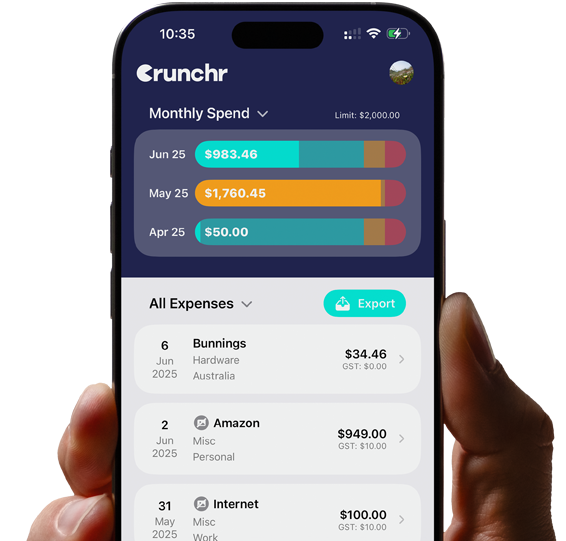
Employees can capture receipts from their phone, review the extracted details and organize each expense using categories, folders and custom GL codes.
The receipt stays connected to the expense.
It stays searchable.
It stays available when accounting needs it later.
For growing teams, Crunchr adds:
- An admin dashboard
- Staff management
- Approvals and workflows
- Bulk actions
- Analytics and spend tracking
- Custom reports
- Bank reconciliation
Business Pro also includes desktop tools for invoice uploads, PDF and email imports, receipt previews and desktop editing.
Not more complexity.
More control.
Without turning every employee into an accountant.
Start Small
A business does not need to rebuild its entire expense process overnight.
Start with the biggest point of friction.
Missing receipts?
Begin with mobile capture.
Slow approvals?
Create a clear workflow.
Reconciliation taking too long?
Make sure every transaction carries its receipt and category from the start.
Fix one part.
Make it normal.
Then improve the next part.
Receipt Management for Real Businesses
Real businesses are busy.
People forget things.
Receipts get lost.
Purchases happen outside the office.
That is exactly why the system needs to be simple.
Employees want a quick way to submit expenses.
Managers want enough information to approve them.
Accounting wants complete records.
Owners want to know where the money is going.
Good receipt management connects all of those needs.
It starts with one small habit.
Capture the receipt while the purchase is still fresh.
From there, the rest becomes easier.
Ready to simplify receipt management? Explore Crunchr and start your free trial.