A receipt scanner should save you time, not create another job.
Take a photo. Check the details. Move on.
At least, that is how it should work.
For plenty of businesses, though, receipts are still a surprisingly messy part of the week.
They sit in wallets. Fade in glove compartments. Get buried in emails. Or appear weeks later with no explanation attached.
A good receipt scanner changes that.
Scan it while you still remember the purchase, check what has been picked up, then send it through with the right details attached.
No chasing.
No guessing.
And far less digging around at month-end.
What Is a Receipt Scanner?
A receipt scanner takes the information on a receipt and puts it somewhere the business can actually use it.
Most of the time, all you need is your phone.
You photograph the receipt.
The scanner reads the image.
Then it identifies details such as:
- Supplier name
- Purchase date
- Total amount
- sales tax
- Currency
- Receipt or invoice reference
Once it is captured, the expense can be sorted, checked and passed on without retyping the whole thing.
It is more than a photo sitting in a camera roll.
It becomes part of the expense record.
Why Businesses Need More Than a Camera Roll
Taking a photo of a receipt is better than losing it.
But a camera roll is not receipt management.
The image still needs context.
Who made the purchase?
Why was it bought?
Where should the cost be recorded?
Did someone approve it?
Has the employee been paid back?
A receipt scanner brings those details together.
Instead of searching through hundreds of photos, the business can search by supplier, amount, date, employee or category.
That is the difference between storing a receipt and actually managing it.
Why Paper Receipts Cause Trouble
Paper receipts do not age well.
They fade.
They tear.
They disappear.
And they usually go missing at the worst possible time.
A contractor grabs a few parts before heading to site.
A sales rep pays for parking before an early flight.
A manager covers lunch during a client meeting.
There is nothing unusual about the purchase.
Three weeks later, the accounting team asks about it and nobody is completely sure which job it belonged to.
Sometimes literally.
Scanning it there and then keeps the receipt and the reason for the purchase together.
Before it fades.
Before it gets lost.
Before the employee forgets what it was for.
Scan It While You Still Remember
The easiest time to deal with a receipt is before you leave the shop, coffee shop or jobsite.
Not Friday.
Not the end of the month.
Right then.
That is when the employee still remembers the purpose, project and category.
It also means the business receives more complete information.
The receipt can be photographed in seconds.
A note can be added.
The expense can be submitted.
Done.
Leave it for a few days and small details start to disappear.
It works best as a quick habit, not something everyone saves for Friday afternoon.
Where AI Saves Time
A basic scanner saves the image.
AI can take care of more than the image.
It can read the receipt and pull out the fields you would otherwise type by hand.
That means less typing.
Less repetition.
And fewer mistakes.
The employee is not stuck entering the supplier, date and total from scratch.
They give the result a quick check and fix anything that looks wrong.
That saving becomes obvious once receipts are coming in from several people.
Ten receipts are one thing.
A hundred feels different.
A thousand becomes a process problem.
It means a growing pile of receipts does not automatically become a growing pile of data entry.
But Receipts Are Messy
Receipt scanning is not always perfect.
Real receipts are messy.
Some are crumpled.
Some are faded.
Some include tips, discounts, surcharges or several tax lines.
Others are photographed in poor light from the passenger seat of a car.
That is why review still matters.
Good software gets most of the work done, while still giving the user a chance to check the odd receipt it misreads.
The scanner handles the repetitive part.
The person submitting it gives the details a final look.
Simple.
Receipt Scanner vs Manual Data Entry
Manual data entry looks cheap.
Until you count the time.
Someone has to open the receipt.
Read each line.
Type the supplier.
Enter the amount.
Choose a category.
Store the image.
Then match it to the transaction.
Repeat that across every employee and every month.
The cost is not only the typing.
It is the interruption.
Employees are asked to resend receipts.
Managers are asked to explain old purchases.
Accounts spends time filling in gaps.
A receipt scanner moves much of that work to the moment of purchase, when it is easiest to complete.
Keep Categories Clear
Getting the image into the system is only part of the job.
The cost still needs the right home.
That is where categories and GL codes matter.
A clear category list helps employees make consistent choices.
Travel.
Accommodation.
Meals.
Vehicle costs.
Office supplies.
Software.
Equipment.
Client expenses.
The list should reflect the business.
Not overwhelm the user.
Too few categories create vague reports.
Too many create confusion.
The aim is clarity.
Make Approvals Easier
A manager should not have to chase basic details before saying yes or no.
The receipt should arrive with the employee, amount, category and a plain explanation of what was bought.
Everything appears together.
The manager can approve it.
Reject it.
Or ask a question.
No long email chain.
No separate spreadsheet.
No searching for the attachment.
The employee should be able to follow it as well.
Submitted.
Waiting on a manager.
Approved.
Processed.
That simple status update cuts down the messages asking whether a claim has been seen or paid.
Making Bank Reconciliation Less Painful
A bank transaction without its receipt leaves accounts with only half the story.
A card statement may show a merchant name nobody recognizes.
The amount is there.
The context is not.
When the receipt has already been scanned and attached, the accounting team can see what the purchase was and who made it.
That removes a lot of detective work.
It is also easier to spot a duplicate, a missing receipt or a purchase that needs an explanation.
Reconciliation becomes checking, rather than searching.
Not a search mission.
What a Good Receipt Scanner Should Include
Some receipt scanners do little more than save a picture.
Some only save images.
Others support the full expense workflow.
For business use, look for:
- Fast mobile receipt capture
- AI data extraction
- Search by supplier, date, amount or employee
- Custom categories and GL codes
- Expense status tracking
- Approval workflows
- Team management
- Reports and analytics
- Bank reconciliation
- Desktop access for administrators
The most important test is simple.
Will people actually use it?
If scanning a receipt feels like work, employees will delay it.
If the app feels natural, the habit is much easier to maintain.
Why Mobile Matters
Receipts are created away from the desk.
At shops.
On jobsites.
At airports.
In coffee shops.
On the road.
That makes mobile capture essential.
Nobody should have to carry the receipt back to the office before dealing with it.
They should be able to scan it, check it and send it through while they are still standing near the counter.
Desktop tools still matter for administrators.
But the capture experience belongs on the phone.
Receipt Scanner for Small Business
Small businesses often feel the pain of poor receipt handling first.
There may be no dedicated finance team.
The owner, office manager or bookkeeper ends up doing the chasing.
A receipt scanner gives the team one simple process.
Employees capture.
Managers approve.
Accounts reviews.
The owner sees the bigger picture.
That structure helps without creating unnecessary complexity.
Receipt Scanner for Growing Teams
Growth changes the problem.
More staff means more purchases.
More cards.
More suppliers.
More approvals.
More chances for something to be missed.
At that point, receipt scanning needs to connect with team controls, workflows and reporting.
The business needs to know who submitted what.
What is waiting for approval.
Where spending is rising.
And which transactions still need attention.
A scanner becomes part of a wider expense management system.
How Crunchr Makes Receipt Scanning Simpler
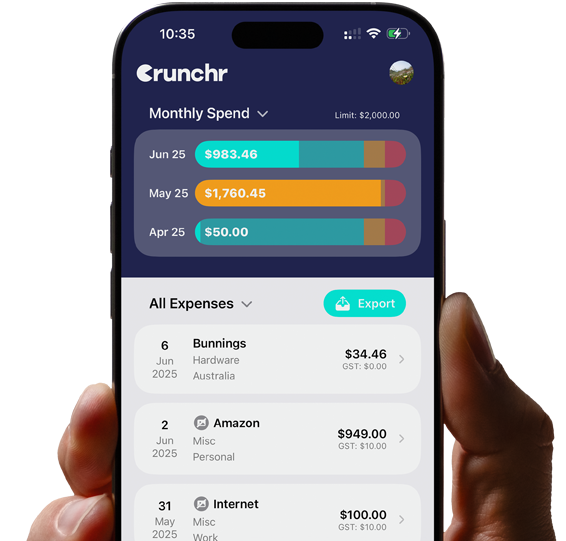
Crunchr is designed to make receipt capture quick.
Employees can scan receipts from their phone and review the extracted details.
Expenses can be organized using categories, folders and custom GL codes.
They remain searchable.
So old receipts do not disappear into a camera roll or inbox.
For growing teams, Crunchr adds an admin dashboard, staff management, approvals, bulk actions, analytics, custom reports and bank reconciliation.
Business Pro also includes desktop access, drag-and-drop invoices, PDF and email imports, editing and receipt previews.
The goal is not to add more admin.
It is to remove it.
Start With One Receipt
Changing the whole expense process can feel like a big job.
It does not need to be.
Start with one rule.
Scan every receipt when the purchase happens.
That one habit improves everything that follows.
The data is cleaner.
The categories are more accurate.
Approvals are faster.
Reconciliation is easier.
And fewer receipts go missing.
A Small Tool With a Big Effect
A receipt scanner may sound like a simple feature.
It is.
That is why it works.
It takes a small task that is often delayed and makes it easy to complete immediately.
For employees, that means less paperwork.
For managers, clearer approvals.
For the accounting team, better records.
For business owners, more visibility over spending.
Receipt scanning should not feel technical.
It should feel obvious.
Take a picture.
Check the details.
Move on.
Ready for a simpler receipt scanner? Explore Crunchr and start your free trial.